Home/

Apps/

Tools/

Music Cutter

Music Cutter
0.0100+

Music Cutter

Music Cutter is a powerful music cutting application.

Play on PC with LDPlayer
recommend

Music Cutter is developed and provided by Alpie0357. LDPlayer offers the download service only.

Alpie0357
How to Download&Play Music Cutter on PC?
Last Updated: 2024-02-07
com.musiccutter.musiceditor
Share:
  • Overview

  • FAQ

Run Music Cutter on PC with LDPlayer

Music Cutter is a Tools application developed by Alpie0357, but with the best Android emulator-LDPlayer, you can download and play Music Cutter on your computer.

Running Music Cutter on your computer allows you to browse clearly on a large screen, and controlling the application with a mouse and keyboard is much faster than using touchscreen, all while never having to worry about device battery issues.

With multi-instance and synchronization features, you can even run multiple applications and accounts on your PC.

And file sharing makes sharing images, videos, and files incredibly easy.

Download Music Cutter and run it on your PC. Enjoy the large screen and high-definition quality on your PC!

Music Cutter is a powerful music cutting application.

Music editor

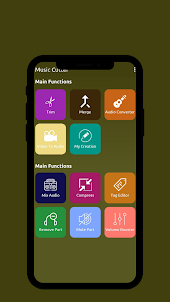
Music Editor is a very useful Audio Editor, MP3 Cutter, Ringtone Maker, Song Editor.

With the Music Editor, you can cut a certain part of the music as a ringtone, alarm se save notification sound.

In addition to Deconstructing the audio layout, you can also use Music Editor to link multiple audio files together, convert audio formats, convert video to audio, compress audio quality, and edit audio metadata; in addition, you can also change the volume. sound and more.


Free music editor, easy and fast audio editing, SUPER powerful, download now!


🎵Powerful Music Cutter and Song Builder
🔥Audio Editor Pro - Free Music and Audio Editor🔥. With this free music editor, you can cut music, crop music, merge audio or mix audio. It is an easy-to-use music cutter and MP3 editor.

🎵MP3 Cutter: Audio Trimmer and Audio Cutter Music editor: You can cut music precisely. You can choose the interrupt position through the built-in music player and sound wave diagram provided by this podcast and wave editor.
Audio Cutter: You can use the audio cutter and music trimmer to easily cut the music or crop the music from the middle. Try using this audio and MP3 cutter for free to cut audio, songs or music tracks. This is a music splitter, audio track, MP3 and song cutter.

🎵Song Maker: Audio Merge & Audio Joiner
Sound merging: You can combine sound and music, you can also split the sound.
Song merging: You can merge music and audio files in different formats.

🎵Song Editor Free: Music Mixer & Song Mixer
Music Mixer: This is an audio mixer with song and audio mixer functions. You can mix music with this music mashup builder.
Multi-track music editing: Add audio to mix songs flexibly, mix music into multi-tracks.

🎵Sound Booster for Free: Bass and Sound Booster
Music booster and Loud speaker: This singing editor is also a bass booster.
Maximum and free sound amplifier: Music you can make the music louder through the sound amplifier.

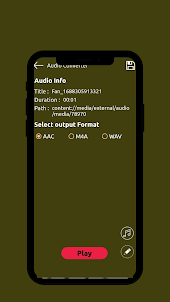
🎵Audio Converter: Audio Compressor & Format Converter
Convenient audio compressor.
MP3 format converter: Convert the format without quality loss.

🎵Video to MP3 Converter: Media Converter and Video Converter
Video audio editor: You can use the video to audio function to extract audio from video and convert video to MP3.
FROM MP4 to MP3: any video can be converted to MP3 with this audio extractor, MP4 converter and music converter.
Open up

Screenshots and Videos of Music Cutter PC

With LDPlayer, you can download and run Music Cutter on PC, simultaneously managing multiple apps and multiple accounts. Become a master of time management, balancing work and entertainment effortlessly.

How to Download and Run Music Cutter on PC

  • 1

    Download and install LDPlayer on your computer

  • 2

    Locate the Play Store in LDPlayer's system apps, launch it, and sign in to your Google account

  • 3

    Enter "Music Cutter" into the search bar and search for it

  • 4

    Choose and install Music Cutter from the search results

  • 5

    Once the download and installation are complete, return to the LDPlayer home screen

  • 6

    Click on the game icon on the LDPlayer home screen to start enjoying the exciting game

Search Recommendation
Download and Run Music Cutter on PC for Free