Home/

Games/

Educational/

First Sentences:Speech Therapy

First Sentences:Speech Therapy
4.95+

First Sentences:Speech Therapy

Teach your kid sentences the fun way!!

Play on PC with LDPlayer
recommend
Little Learning Lab
How to Download&Play First Sentences:Speech Therapy on PC?
Last Updated: 2024-03-23
com.LittleLearningApp.com.unity.FirstSentences
Share:
  • Overview

  • FAQ

Use LDPlayer to Play First Sentences:Speech Therapy on PC
First Sentences:Speech Therapy is a Educational application developed by Little Learning Lab, but with the best Android emulator-LDPlayer, you can download and play First Sentences:Speech Therapy on your computer.

Running First Sentences:Speech Therapy on your computer allows you to browse clearly on a large screen, and controlling the application with a mouse and keyboard is much faster than using touchscreen, all while never having to worry about device battery issues.

With multi-instance and synchronization features, you can even run multiple applications and accounts on your PC.

And file sharing makes sharing images, videos, and files incredibly easy.

Download First Sentences:Speech Therapy and run it on your PC. Enjoy the large screen and high-definition quality on your PC!

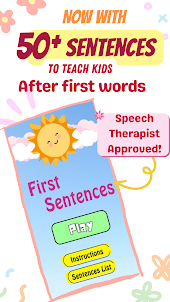
This is a speech therapy session in your hands. Explore a captivating game filled with interactive design, delightful voice & articulation sounds, and an array of fun and silly sound effects that make learning a joyous experience for your child.

Key Features:

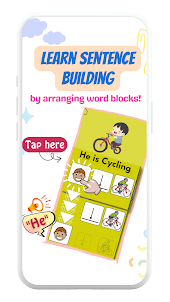
Interactive Gameplay: First Sentences Adventure offers an interactive learning experience where children assemble word blocks into complete sentences . Children will engage with colorful pictures, each with a tap to move feature essential to teach sentence-building skills.

Speech & Language Modelling: My First Sentences is designed with the principles of Speech Therapy to support a developing child’s language learning experience. The modeling of each word and sentence along with the visual symbols of each word help children learn the meaning and use of different words and sentences.

Visual sentences: In My First Sentences, each word that makes up the sentence is visualized using universal picture symbols that are often seen in AAC devices. Because of this, words are clearer, meaningful and consistent across all learning materials. Therefore it is also great to be used with non-speaking autistic kids to help their sentence making ability.

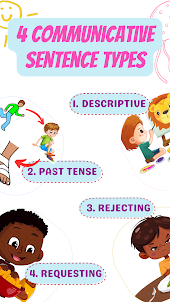
Progressive Learning: The game has carefully designed levels to ensure a gradual increase in difficulty and cover the 4 types of sentences children learn to communicate at their developing age.

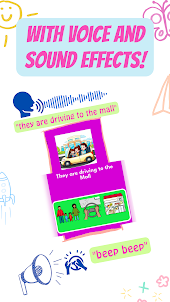
Voice Articulation Sounds: Our game comes equipped with a Speech Pathologist’s voice to bring pictures to life. The voice is designed to be cheerful, engaging, rich in intonation and slow to allow time for your child’s language processing. Kids will enjoy imitating the characters' voices and articulating words themselves, enhancing their pronunciation and speech development in a playful and engaging manner.

Fun Sounds: Every interaction in My First Sentences triggers lively and entertaining sound effects. From the sounds of a toy train (“choo choo”) to sounds of disappointment (“uh oh”).


Educational Objectives:

Speech & Language Development: Children learn to speak their early sentences and understand sentence patterns.

Communication Skills: The sentences help kids express their thoughts and needs using different words and sentence types in daily life.

Literacy Development: Because of the rich and meaningful vocabulary with respective symbols, children get to learn words and word structures by sight.

Sentence Formation: First Sentences Adventure focuses on constructing simple, age-appropriate sentences to establish a strong language foundation.

Vocabulary Expansion: Children encounter a diverse array of words and Sentences, broadening their vocabulary as they explore exciting landscapes.

Pronunciation Improvement: Voice articulation sounds help kids refine their pronunciation and enhance communication skills.
Open up

Screenshots and Videos of First Sentences:Speech Therapy PC

Experience a wider field of view, exquisite game graphics, and cooler combat skills and effects by downloading and playing First Sentences:Speech Therapy on PC with LDPlayer. Enjoy the ultimate gaming experience with LDPlayer.
Why Play First Sentences:Speech Therapy on PC with LDPlayer?

LDPlayer offers unique emulator features including multi-instance support, macros, operation recorder, and other functions not available on mobile devices.

Multi-Instance & Sync

Remote Control

Custom Controls

Multi-Instance & SyncRemote ControlCustom Controls

Effortlessly clone multiple instances and initiate synchronization until you draw the desired hero before binding your account, enhancing efficiency in rerolls in First Sentences:Speech Therapy.

  • High FPS

    With support for high FPS, First Sentences:Speech Therapy's game graphics are smoother, and actions are more seamless, enhancing the visual experience and immersion of playing First Sentences:Speech Therapy.
  • Video Recorder

    Easily capture your performance and gameplay process in First Sentences:Speech Therapy, aiding in learning and improving driving techniques, or sharing gaming experiences and achievements with other players.

How to Download&Play First Sentences:Speech Therapy on PC?

  • 1

    Download and install LDPlayer on your computer

  • 2

    Locate the Play Store in LDPlayer's system apps, launch it, and sign in to your Google account

  • 3

    Enter "First Sentences:Speech Therapy" into the search bar and search for it

  • 4

    Choose and install First Sentences:Speech Therapy from the search results

  • 5

    Once the download and installation are complete, return to the LDPlayer home screen

  • 6

    Click on the game icon on the LDPlayer home screen to start enjoying the exciting game

Download and Play First Sentences:Speech Therapy on PC (Emulator)