Orb Keeper is a Casual game developed by Joynity. LDPlayer is the best platform for playing Orb Keeper on Windows PC, offering powerful features to enhance your immersive experience in Orb Keeper.
When playing Orb Keeper on your computer, if you find repetitive actions or tasks tedious and time-consuming, fret not! Macro can alleviate your concerns. Simply record your actions with a click of the screen recording feature and let macros take care of the rest. Macros automate your operations, allowing you to effortlessly conquer the game with minimal effort! Start downloading and playing Orb Keeper on your computer now!
Embark on an Epic Dragon Adventure!Orb Keeper is an exhilarating action-adventure game where you control magnificent dragons with unique abilities on a quest to safeguard mystical orbs. Your mission: guide your dragons as they carry precious orbs through challenging environments and deliver them safely to sacred altars.
Game Features:
• Command Powerful Dragons - Choose from a variety of dragon types including Metal, Leaf, Water, Red, Skeleton, and Thunder dragons, each with unique abilities and handling characteristics!
• Master Strategic Gameplay - Carefully navigate obstacles, avoid enemies, and maintain control of your orb throughout your journey.
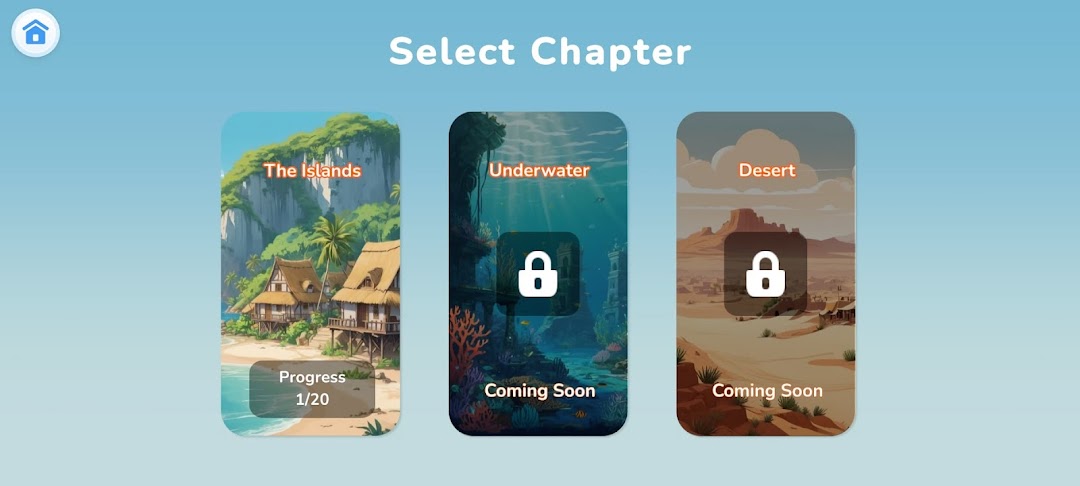
• Explore Diverse Worlds - Begin your adventure in The Islands with 20 exciting levels, and prepare for upcoming chapters in mysterious Underwater realms and treacherous Desert landscapes!
• Collect and Upgrade - Earn coins as you complete missions, upgrade your dragons, and unlock powerful new abilities to tackle increasingly challenging levels.
• Beautiful Visuals - Immerse yourself in colorful, vibrant environments with smooth animations and spectacular effects.
• Easy to Learn, Challenging to Master - Simple touch controls make the game accessible for all ages, while progressive difficulty will test even the most skilled players.
Can you master the art of orb keeping across all worlds and become the ultimate dragon keeper?
Download Orb Keeper now and begin your dragon adventure!