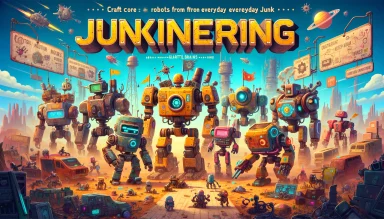
Junkineering: Robot Wars RPG is a Role Playing game developed by Coleplay LTD, and LDPlayer is the best platform for playing Junkineering: Robot Wars RPG on Windows PC, offering powerful features for an immersive experience.
When playing Junkineering: Robot Wars RPG on PC, as a new player looking to start with a fresh account, the multi-instance and sync features are extremely useful for rerolls. You can use them to run multiple instances and begin the synchronization process. Bind your account until you draw the desired heroes.
In addition, operation recorder is great for games that require you to level up and complete tasks! Run the sync and record your actions, then repeat the main instance's actions in real-time. By doing so, you can run 2 or more accounts simultaneously. You can always get the heroes you want before others by faster rerolls and more efficient summoning! Start downloading and playing Junkineering: Robot Wars RPG on your computer now!
Do you thrive on the thrill of survival in futuristic robot RPG adventure games?Step into the world of robot wars in Junkineering: a turn-based futuristic RPG where engineering meets irony and survival depends on your wits. Fight in chaotic robot wars and robot shooting games, master every robot fight in intense robot games battles, and conquer a world shaped by apocalypse.
Assemble a squad of custom robots crafted from everyday junk, each brought to life by an AI-core brain. Dominate the arena in tactical robot wars, where every move defines your fate in this mix of survival, strategy, and post-apocalyptic irony.
⚙️ POST-APOCALYPTIC SURVIVAL
Immerse yourself in a desolate wasteland scarred by an apocalypse. Resource scarcity and tech advancements create a narrative inspired by real-world challenges. Survival is not just a goal; it’s the essence of every clash in this unforgiving setting.
🔧 CRAFT AND COLLECT
Engineer your ultimate squad! Collect scrap, build robots with unique abilities, and upgrade them to face the fiercest enemies. Crafting is key to making your squad an unstoppable force.
⚔️ DYNAMIC FIGHTING & AUTO-BATTLE
Engage in thrilling PvE battles. Balance strategic gameplay with chaotic unpredictability. Each fight is a test of skills: win through clever tactics or use the convenient auto-battle mode to let your squad crush enemies on their own!
🛡️ TEAM-BASED STRATEGY
Form a squad of ironclad heroes and coordinate your actions to unleash devastating combos on your enemies. Surviving is much easier with a team you can trust.
🏰 TOWER PROTOCOLS & EPIC BOSSES
Challenge yourself in our unique Tower modes! Conquer 1,000 floors in the general Apex Protocol, or master the elemental Rock-Paper-Scissors mechanics in the Stoneborn (Rock), Scorchdoc (Scissors), and Shredbyte (Paper) Protocols. Defeat hordes of monsters and mighty bosses for valuable prizes, and complete daily quests to level up fast!
🏆 PvP ARENA & TOURNAMENTS
Test your tactical skills in asynchronous PvP battles against other players' squads! Participate in intense tournaments and championships, earn rare resources, and climb to the top of the leaderboards. Prove who truly rules the arena!
🎭 ENGINEERING WITH IRONY
Build not just robots, but legends! Experience a gameplay full of wit and surprises. The humor and irony woven into the narrative add a unique charm. Engineering isn’t just functional; it’s an art.
🎁 EPIC REWARDS
Unlock powerful new heroes, weapons, maps, and game modes. Collect rare loot and celebrate your triumphs. The more you fight and explore, the greater your legendary rewards.
Junkineering is more than just a game; it’s a clash of survival, engineering, and fighting spirit. Master the art of engineering and turn the junk of yesterday into the legends of tomorrow!
Are you ready to engineer your survival, conquer the apocalypse, and become a legend? Download Junkineering today and experience the ultimate RPG adventure!