Mynet Haber - Son Dakika Haber
Breaking news and tools to make daily life easier are in your pocket for free.
Mynet Haber - Son Dakika Haber is developed and provided by Mynet. LDPlayer offers the download service only.
Overview
FAQ
Run Mynet Haber - Son Dakika Haber on PC with LDPlayer
Mynet Haber - Son Dakika Haber is a News&Magazines application developed by Mynet, but with the best Android emulator-LDPlayer, you can download and play Mynet Haber - Son Dakika Haber on your computer.
Running Mynet Haber - Son Dakika Haber on your computer allows you to browse clearly on a large screen, and controlling the application with a mouse and keyboard is much faster than using touchscreen, all while never having to worry about device battery issues.
With multi-instance and synchronization features, you can even run multiple applications and accounts on your PC.
And file sharing makes sharing images, videos, and files incredibly easy.
Download Mynet Haber - Son Dakika Haber and run it on your PC. Enjoy the large screen and high-definition quality on your PC!
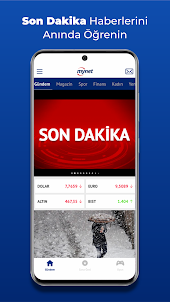
With the Mynet News application, you can follow up-to-date sports, magazines, newspapers, politics and all breaking news for FREE.Download the agenda related specifically designed to free Aol News for the latest news and developments in Turkey and the latest news from around the world come immediately, and your phone quickly.
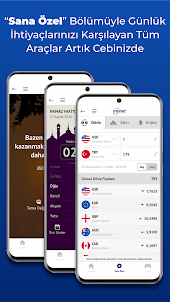
Mynet News application has been renewed! All the tools that meet your daily needs with a special section are in one application.
Mynet, with its renewed news application, the most up-to-date and last minute news instantly on your phone 24/7.
- Easily listen to the news with reading aloud feature,
- Whether using night mode or day mode,
- Easy access by mail account,
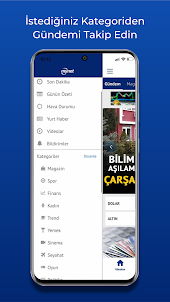
- Customizing categories according to interest and personalization,
- Easy to use, switch between news and categories with finger gesture,
- Commenting on content, responding to comments,
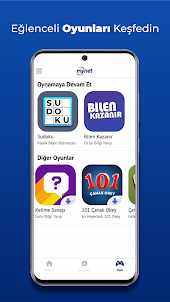
- Ability to play the most entertaining games such as Sudoku, Knowing Wins, Word War, Okey for free,
- Quick access to news with widget feature,
- Women, skin care, recipes, dessert recipes and ingredients,
- Latest news on politics, life, world, agenda, technology, travel,
- Last minute sports news, transfer developments, live match results, live match narration, match summaries and match videos,
- Sports developments about Fenerbahçe, Galatasaray, Beşiktaş, Trabzonspor and all major teams,
- Developments in the magazine world, developments from celebrities, photos,
- Instant access to stock market, stock, financial information and the most up-to-date information about the markets,
- Gold, currency information and economic developments in the world,
- With the Financial Converter, you can make your currency, gold, crypto translations, if you want, you can view the price values for all assets instantly,
- To be able to learn instant traffic situation,
- Instant, daily and monthly weather forecasts of all cities,
- Contents related to astrology, horoscope, birth chart,
- News about cinemas, latest movies to be released, latest music and information about all artistic activities,
- Being able to follow prayer times and azan times by location,
- With mobile notifications, the opportunity to set a notification on your phone for the Prayer Time you want, to be notified when the prayer time is approaching,
- Access to the day's summary, analysis, reports, galleries and videos,
- Possibility to follow all news and content with push notifications and stay on the agenda.
You can write all your criticisms and suggestions about the Mynet News application via the "Report opinion" in the application or directly to mobil@mynet.com.
Screenshots and Videos of Mynet Haber - Son Dakika Haber PC
How to Download and Run Mynet Haber - Son Dakika Haber on PC
- 1
Download and install LDPlayer on your computer
- 2
Locate the Play Store in LDPlayer's system apps, launch it, and sign in to your Google account
- 3
Enter "Mynet Haber - Son Dakika Haber" into the search bar and search for it
- 4
Choose and install Mynet Haber - Son Dakika Haber from the search results
- 5
Once the download and installation are complete, return to the LDPlayer home screen
- 6
Click on the game icon on the LDPlayer home screen to start enjoying the exciting game