BMI-Calculator: Weight Tracker
Simple Weight Calculator And BMI Tracker To Monitor Your Health And Fitness Goal
BMI-Calculator: Weight Tracker is developed and provided by 5W APPS GmbH. LDPlayer offers the download service only.
Overview
FAQ
Run BMI-Calculator: Weight Tracker on PC with LDPlayer
BMI-Calculator: Weight Tracker is a Health&Fitness application developed by 5W APPS GmbH, but with the best Android emulator-LDPlayer, you can download and play BMI-Calculator: Weight Tracker on your computer.
Running BMI-Calculator: Weight Tracker on your computer allows you to browse clearly on a large screen, and controlling the application with a mouse and keyboard is much faster than using touchscreen, all while never having to worry about device battery issues.
With multi-instance and synchronization features, you can even run multiple applications and accounts on your PC.
And file sharing makes sharing images, videos, and files incredibly easy.
Download BMI-Calculator: Weight Tracker and run it on your PC. Enjoy the large screen and high-definition quality on your PC!
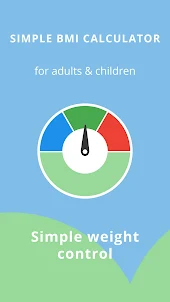
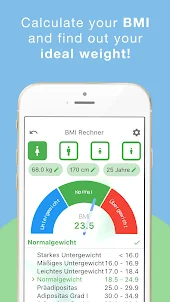
BMI Calculator – Accurate Weight Calculator & Weight Tracker for a Healthier YouTrying to stay in shape, lose weight, or monitor your health? Our BMI calculator and weight tracker app makes it easy to stay on top of your goals. Backed by the official WHO formula, this smart weight calculator helps you understand your body and make informed decisions.
Whether you’re an adult looking to manage your health, a teen tracking fitness goals, or a parent monitoring your child’s development, this BMI calculator and weight tracker gives you the tools you need — all in one simple app.
Why This Is the Best BMI Calculator & Weight Tracker for You:
- Accurate BMI Calculator: Uses the scientifically trusted WHO BMI formula for fast and reliable results.
- Smart Weight Tracker: Easily log your weight, view progress over time, and stay motivated with visual feedback.
- Ideal Weight Calculator: Discover your healthy weight range and set realistic goals based on your body metrics.
- Designed for Everyone: Great for women, men, teens, and kids — your entire household can use this app.
- Quick and Simple: User-friendly interface designed to give you instant results with just a few taps.
How It Works
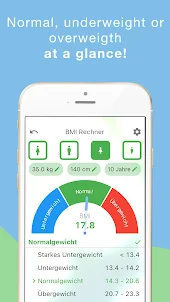
The BMI calculator uses your height and weight to provide your Body Mass Index — an internationally used method to evaluate your body composition. Your results are classified according to WHO guidelines to tell you if you’re underweight, normal, overweight, or obese.
The built-in weight tracker lets you monitor changes over time. Set a goal and follow your progress visually, whether you're working toward weight loss, muscle gain, or simply maintaining your current weight.
Who Is This App For?
- People looking to calculate BMI quickly and accurately
- Anyone needing a daily weight tracker
- Users setting weight goals with the help of a weight calculator
- Families who want to track their health together
- Dieters, fitness fans, and health-conscious individuals of all ages
Key Features:
- Scientifically accurate BMI calculator
- Visual and simple weight tracker
- Personal weight calculator to find your healthy range
- WHO-based BMI classification for clarity
- Works for adults and children
- Clean design with instant feedback
Start your wellness journey today. This is more than just a BMI calculator — it’s your complete weight tracker and weight calculator in one powerful app.
Download now and take the first step toward a healthier lifestyle with the most trusted BMI calculator and weight tracker made for your everyday needs.
Questions or feedback? We’d love to hear from you: bmi@5w-verlag.de
Screenshots and Videos of BMI-Calculator: Weight Tracker PC
How to Download and Run BMI-Calculator: Weight Tracker on PC
- 1
Download and install LDPlayer on your computer
- 2
Locate the Play Store in LDPlayer's system apps, launch it, and sign in to your Google account
- 3
Enter "BMI-Calculator: Weight Tracker" into the search bar and search for it
- 4
Choose and install BMI-Calculator: Weight Tracker from the search results
- 5
Once the download and installation are complete, return to the LDPlayer home screen
- 6
Click on the game icon on the LDPlayer home screen to start enjoying the exciting game