


Asana Rebel: Get in Shape
Use LDPlayer to Play Asana Rebel: Get in Shape on PC
Asana Rebel: Get in Shape is a Health&Fitness application developed by Asana Rebel, but with the best Android emulator-LDPlayer, you can download and play Asana Rebel: Get in Shape on your computer.
Running Asana Rebel: Get in Shape on your computer allows you to browse clearly on a large screen, and controlling the application with a mouse and keyboard is much faster than using touchscreen, all while never having to worry about device battery issues.
With multi-instance and synchronization features, you can even run multiple applications and accounts on your PC.
And file sharing makes sharing images, videos, and files incredibly easy.
Download Asana Rebel: Get in Shape and run it on your PC. Enjoy the large screen and high-definition quality on your PC!
Screenshots and Videos of Asana Rebel: Get in Shape on PC


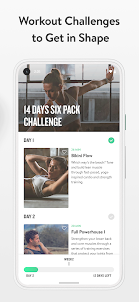
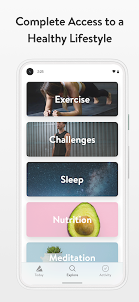
Why Play Asana Rebel: Get in Shape on PC with LDPlayer?
How to Download Asana Rebel: Get in Shape on PC?
Download and install LDPlayer on your computer
Locate the Play Store in LDPlayer's system apps, launch it, and sign in to your Google account
Enter "Asana Rebel: Get in Shape" into the search bar and search for it
Choose and install Asana Rebel: Get in Shape from the search results
Once the download and installation are complete, return to the LDPlayer home screen
Click on the game icon on the LDPlayer home screen to start enjoying the exciting game
If you've already downloaded the APK file from another source, simply open LDPlayer and drag the APK file directly into the emulator.
If you've downloaded an XAPK file from another source, please refer to the tutorial for installation instructions.
If you've obtained both an APK file and OBB data from another source, please refer to the tutorial for installation instructions.
Not for beginners and pretty frustrating. The few intro courses are OK if you slow them down but then the rest is all for people who already know all the poses. They whizz through them in seconds without teaching you how to do them, even though they label them "beginner". Shame. I have added an extra point for the very good customer service. My problem was dealt with within an hour!
I'm torn with this app. On the one hand, the workouts are what I have been looking for. BUT. No attention is payed to good posture and alignmend throughout the asanas. This app is only for intermediate-advanced yogies who know how to do transitions and positions and won't hurt themselves. Another minus point is that there is no browser option available. Just the phone screen is too small. And finally it's a downside that it's not possible to add challenges to the home screen. Endless klicking.
Frankly the app offers no roadmap, intro, induction or support and only videos of perfect people doing seriously advanced yoga, which is zero help and just depressing for beginners. The support and refund request process only goes in circles or dead ends. It's perfectly obvious that this entire package is just designed to fleece as much money as possible with as little effort as possible.