Frostborn: Survival RPG is a Role Playing game developed by KEFIR!, and LDPlayer is the best platform for playing Frostborn: Survival RPG on Windows PC, offering powerful features for an immersive experience.
When playing Frostborn: Survival RPG on PC, as a new player looking to start with a fresh account, the multi-instance and sync features are extremely useful for rerolls. You can use them to run multiple instances and begin the synchronization process. Bind your account until you draw the desired heroes.
In addition, operation recorder is great for games that require you to level up and complete tasks! Run the sync and record your actions, then repeat the main instance's actions in real-time. By doing so, you can run 2 or more accounts simultaneously. You can always get the heroes you want before others by faster rerolls and more efficient summoning! Start downloading and playing Frostborn: Survival RPG on your computer now!
Subdue the powers of the gods and confront the army of the dead together with your friends! Make the lands of Vikings great again by building a new capital town from scratch and set off for treasures in this isometric, top-down online survival action RPG, Frostborn!The world plunged into darkness In the wilds of Midgard, the dead roam in broad daylight. The water from the rivers burns your throat, Valkyries no longer take the fallen to Valhalla, and something sinister hides in the shadows. The goddess Hel has cursed these lands, and now you must fight to survive in this top-down RPG saga.
No man is an island:
Co-op, family, and alliances Team up with other Vikings to thrive! Create or join a Family of up to 4 players to share a common fortress and pool your resources for faster progression. Co-op opens up massive opportunities: form peaceful alliances with neighbor clans, trade valuable items, or unite your forces to clear dangerous dungeons.
Thrive as a lone wolf:
Prefer playing solo? Surviving alone is just as engaging and rewarding. Single players can enjoy their own pace: master stealth, execute quick tactical resource runs, build a secure private hideout, and explore the vast world of Midgard on your own terms.
Deep crafting and fortress building:
Gather basic and rare resources—wood, stone, ores, and magic components—to fuel a deep craft system. Produce everything from essential tools, health potions, and deadly traps to high-tier armor sets and legendary weapons. Build and customize your base with reinforced walls, craft stations, and storage. Later, band together to rebuild a grand capital city and forge your own drakkar for overseas raids!
Fair rewards and no energy restrictions:
Unlike other survival games, Frostborn has no energy system for traveling between locations—explore Midgard freely without artificial timers. What's more, any top-tier armor or weapon can be earned 100% for free simply by clearing specific locations, defeating bosses, and participating in active in-game events.
Mounts and companion pets:
Traverse the wilderness faster by taming unique riding mounts—from swift horses to mighty riding wolves and armored bears. You can also bring loyal combat and utility pets along to assist you in battles and help gather extra loot.
Berserk, mage or assassin - the choice is yours:
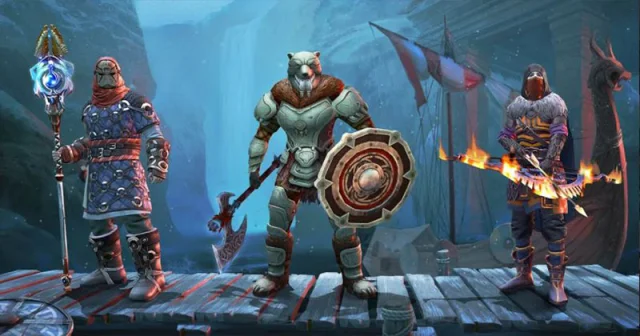
Choose from over a dozen RPG-style classes that suit you best. Do you like heavy armor and face-to-face battles? Choose between Protector, Berserk or Thrasher! Prefer to keep your distance and shoot arrows from afar? Pathfinder, Sharpshooter or Hunter at your service! Or hide among the shadows as a Bandit, Robber or Assassin!
There's no daylight underground:
Go down to ancient underground sanctuaries—dungeons in the best traditions of MMORPGs. Fight powerful bosses that fear daylight, bypass deadly traps, claim legendary artifacts, and discover why the gods left this world.
Experience Frostborn, the isometric survival action RPG from Kefir studio, the creators of Last Day on Earth. Join now, build your legacy, and live like a true Viking!