Jump Ball Stack is a Arcade application developed by simplefishgames, but with the best Android emulator-LDPlayer, you can download and play Jump Ball Stack on your computer.
Running Jump Ball Stack on your computer allows you to browse clearly on a large screen, and controlling the application with a mouse and keyboard is much faster than using touchscreen, all while never having to worry about device battery issues.
With multi-instance and synchronization features, you can even run multiple applications and accounts on your PC.
And file sharing makes sharing images, videos, and files incredibly easy.
Download Jump Ball Stack and run it on your PC. Enjoy the large screen and high-definition quality on your PC!
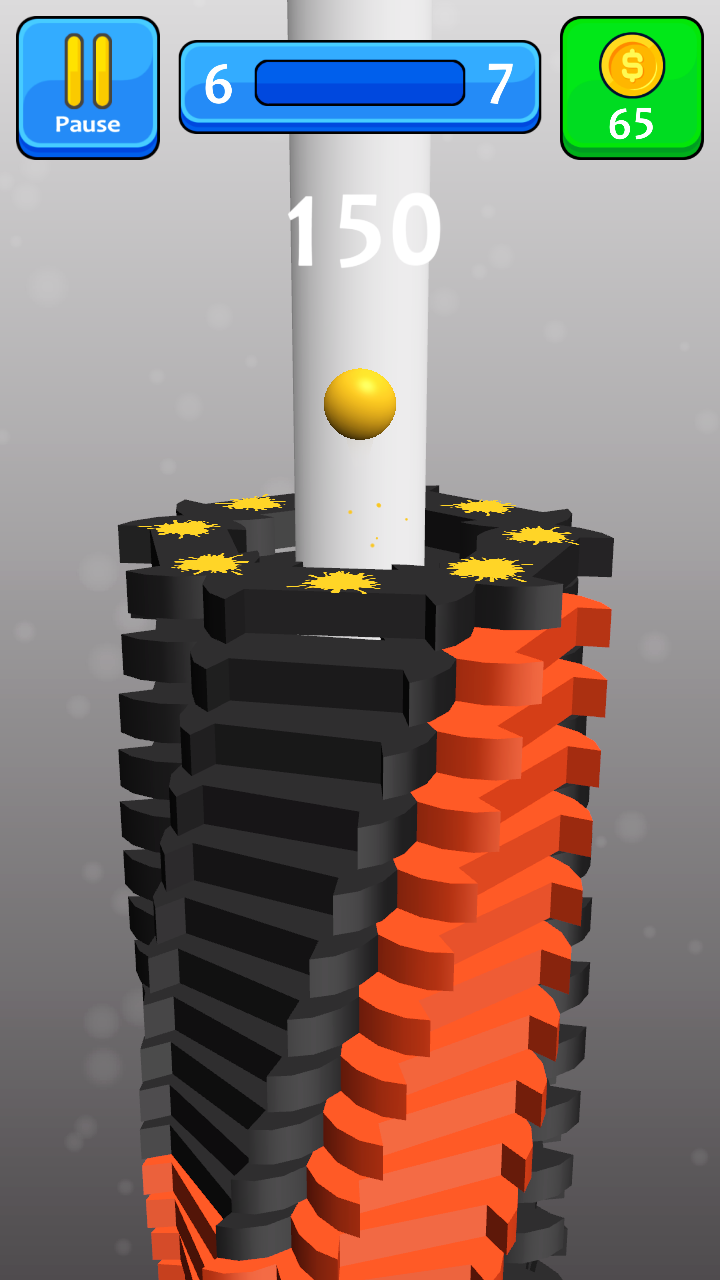
Jump Ball Stack is simple arcade adventure game with bouncing ball.Tap and press finger on the screen when jumping ball is on the correct color piece.
Color ball bounce around platforms and drop down through labyrinth.
In this case ball falls down through platforms. You can rotate the tower to avoid break and crush.
Breakdown the tower to open the next advanced and interesting level. Control your speed.
Crush bricks along spiral stack is really fun when you extremely blast!
Features:
- Super fast xtreme gameplay with high optimization (not unity).
- Real latest 3d graphics for 2020. Colorful application.
- Upgrade and update your reaction! It's amazing time killer (but no song)!
- Different skins (teapot, helix, star and others) for player.
- Great colors of bricks and original animation.
- Boost option gives you blast or break all stack platforms. Crash pieces everywhere!
- Easy to start playing, but some levels is hard.
- Very small download size of the lite app (low mb apk).
- Popular theme for boys and girls, children and adults.
- Working offline with no ads and also online.
- Install new version and play this hit now!
Play this best falling down game with friends and family!
Be the best crusher in Jump Ball Stack!
Slice and smash all platforms by jumping!
Enjoy!