Chaos Zero Nightmare (CZN) developed by Super Creative and published by Smilegate, the dark fantasy roguelike launched globally on October 22, 2025, and within three months pulled in roughly $40 million on mobile alone—enough to earn Sensor Tower’s “Best New ACG Game” nod for 2025. A year later, the game is still running seasonal content, collaboration events, and a steady cadence of redeem codes that hand out Crystals, Signal Amplification Anchors, and other resources without asking for a single clear.
This breakdown separates what is genuinely active in November 2026 from what has already expired, and walks through both redemption paths—in-game and through the official STOVE portal—so you are not guessing which method actually works.
What Is Actually Working Right Now
LDPlayer: The Best Android Emulator to Play Chaos Zero Nightmare on PC!!!
The codes below are the ones still within their registration windows as of November 2026. They come from two distinct sources: the new Production Director’s welcome gifts and the 1st Anniversary celebration. Treat them as separate buckets, because some players assume every code stacks—it does not.
The New Production Director Series
When CZN’s new Production Director took over, the team rolled out a three-part gift campaign for players. Each code grants the same reward, but each is a separate registration. You need to redeem all three individually if you want the full 30 Signal Amplification Anchors.
|
Code |
Reward |
Registration Window |
CZNNEWPDGIFT1ST |
Signal Amplification Anchor ×10 |
Sept. 23 – Nov. 30, 2026 |
CZNNEWPDGIFT2ND |
Signal Amplification Anchor ×10 |
Sept. 30 – Nov. 30, 2026 |
CZNNEWPDGIFT3RD |
Signal Amplification Anchor ×10 |
Oct. 7 – Nov. 30, 2026 |
1st Anniversary and Livestream Rewards
The anniversary celebration produced these additional active codes.
|
Code |
Reward |
Registration Window |
10211STANNIVERSARY |
Crystals ×500 |
Oct. 20 – Nov. 19, 2026 |
HAPPY1YEARCZN |
Tears of God ×5 |
Oct. 28 – Nov. 11, 2026 |
CZNNOVEMBERGIFT |
Lumina Lens ×5 |
Nov. 3 – Nov. 17, 2026 |
How to Redeem CZN Codes
Download LDPLAYER, play Chaos Zero Nightmare on PC, enhance your gaming experience!


CZN gives you two legitimate redemption routes. The in-game method is faster for most players, but the STOVE web portal exists for a reason—and on iOS, it is sometimes the only route that behaves.
In-Game Redemption
1. Clear the tutorial and reach the Lobby. The coupon menu will not surface before this point.
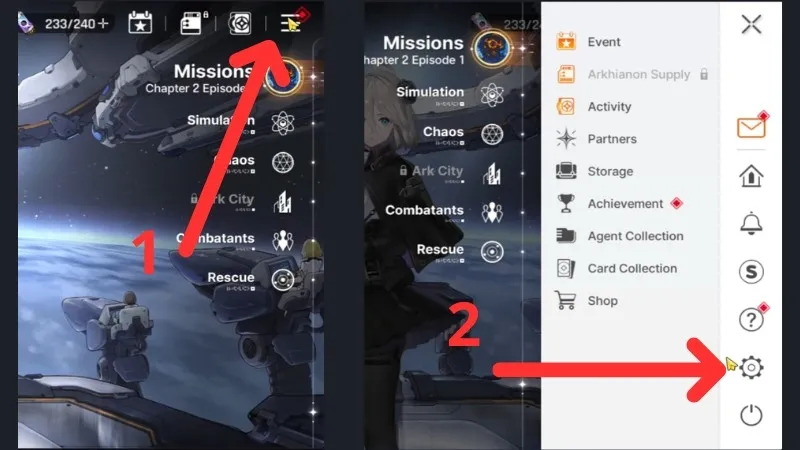
2. Tap the Menu icon (three horizontal lines) in the top-right corner.
3. Select Settings (the gear icon).
4. Scroll to Account Settings at the bottom of the left-hand menu.
5. Tap Register Coupon, enter the code exactly as written, and confirm.
6. Check your in-game mailbox. Rewards land there, not in your inventory directly.
The mailbox detail matters more than it seems. Coupon rewards are stored for 30 days after registration, but they do not auto-claim. If you register a code and close the game without opening the mailbox, the reward sits there until it expires.
The STOVE Portal Method
The official Chaos Zero Nightmare coupon page on STOVE is the fallback when the in-game menu glitches, and it is the required route for certain web-distributed codes. The login flow is more flexible than most players realize:
1. Go to the official CZN coupon page on the STOVE website.
2. Choose your login path. You can sign in with a full STOVE account, or select the guest/“Register without login” option and enter your **Server**, **Character Name**, and **Member Number** manually.
3. Paste the code and submit.
4. Return to the game and open your mailbox.
The guest option is not a workaround—it is an officially supported flow. If you normally log into CZN through Apple, Google, or another linked account and do not want to create a separate STOVE identity just for a code, the guest registration removes that friction. One caveat: if you are on iOS and the in-game coupon page refuses to load or restricts Google login, the external STOVE link is the recommended alternative rather than retrying the in-game button.