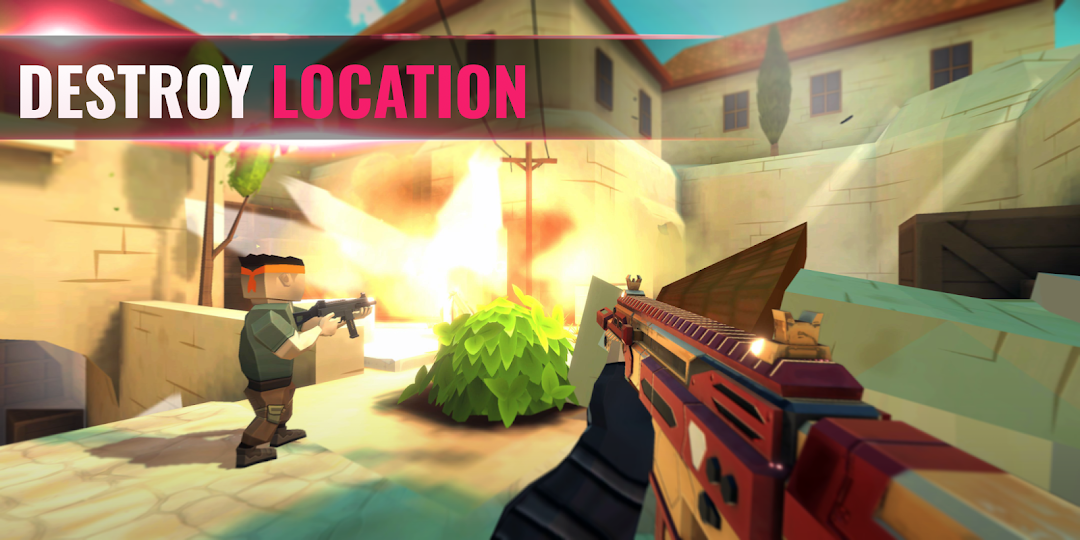
Tactic Shot: FPS Pixel Shooter is a Action game developed by Pixelvoid Games Ltd, and LDPlayer is the best platform for playing Tactic Shot: FPS Pixel Shooter on PC, offering powerful features to immerse you in the game.
When playing Tactic Shot: FPS Pixel Shooter on computer, you can adjust frame rate settings for smooth gameplay and stunning visuals.
LDPlayer also provides pre-configured keyboard mapping for convenient control of the entire game. Continuous optimization of keyboard mapping enhances key sensitivity and skill accuracy. Additionally, LDPlayer offers special buttons like shoot, hide mouse, and continuous key press for an enhanced gaming experience.
If you prefer using a gamepad, the automatic gamepad detection allows you to customize controls with just a few clicks, enabling you to freely maneuver your hero. Start downloading and playing Tactic Shot: FPS Pixel Shooter on your computer now!
DOMINATE THE BATTLEFIELDGet ready to enter the next generation of mobile first person shooting games! Our 3d pixel games bring heart-pounding FPS action straight to your fingertips with a fast, fluid, and explosive PvP experience. These battle games transform your phone into a warzone where precision, speed, and smart decisions determine your fate.
Features:
- Massive selection of weapons
- Open world cross-platform multiplayer
- Destructible environments for deeper gameplay
- Variety of game modes: Team Deathmatch, AWP Sniper Duels, Bomb Defusal, Knife Fights
- Ranking progression and in-game events
- Customizable characters and weapon skins in rpg arcade games
- Optimized performance for low-end devices
🔫 POWERFUL ARSENAL
Feel the adrenaline rush of multiplayer games online. Equip deadly shotguns, tactical assault rifles, rapid-fire pistols, and razor-sharp knives. Master each gun and find your ideal loadout to dominate the PvP battle royal. Experiment with military gear, adapt your strategy in sandbox voxel games, and prove yourself in every pvp shooter fight.
🌐 CROSS-PLATFORM MULTIPLAYER BATTLES
No battle is more epic than the one where every second matters. Full cross-platform support allows you to compete against players from all over the globe in online shooting games. Coordinate your elite squad of assassins, outthink your wild enemies, and earn your glory. All you need is determination, quick reflexes, and a bit of madness. Are you ready to prove you're the best in the fps shooting games?
🔨 DESTRUCTIBLE ENVIRONMENTS
Blow up buildings, smash through walls, detonate train cars, and take control of the battlegrounds. Tactical destruction isn’t just for show but for deep immersion into every pixelgun match. Tear down enemy cover, set traps, or open up new flanking routes. The world becomes your killing weapon.
🎮 GAME MODES FOR EVERY WARRIOR
Team Deathmatch - Join bloody forces with cyber teammates in real firefights.
AWP Sniper Duels - One shot, one opportunity. There’s no room for mistakes.
Bomb Defusal - Will you plant the bomb or stop the countdown? Choose your side and act fast. The clock is ticking...
Knife Fights - Brutal close-quarters combat. You have to keep riding or to be swallowed.
🏆 RANKINGS & EVENTS
Every match brings you closer to the top. Climb the competitive ranks by earning points through victories and skillful play. Special in-game events and rewards let you level up faster and collect exclusive loot.
🎨 SKIN & WEAPON CUSTOMIZATION
Express your soldier style with different character and weapon skins in the 5v5 war simulator games. Customize your fighter’s look and outfit your weapons with cool designs. Unlock new skins through events, progression, and in-game achievements. Don’t miss your chance to build a collection everyone will envy.
Also, the game offers in-game purchases:
1. weapon skins;
2. character skins;
3. equipment items;
4. in-game currency.
All the purchases are made only with the consent of the user.
Please read our privacy policy and EULA
https://pixelvoidgames.com/privacy.html
https://pixelvoidgames.com/terms_of_use.html