Home/

Games/

Word/

Wocable

Wocable
4.05+

Wocable

Social Word Game

Play on PC with LDPlayer
recommend
Temel Yazılım
How to Download&Play Wocable on PC?
Last Updated: 2024-08-27
com.wocable.game
Share:
  • Overview

  • FAQ

Use LDPlayer to Play Wocable on PC

Wocable is a Word application developed by Temel Yazılım, but with the best Android emulator-LDPlayer, you can download and play Wocable on your computer.

Running Wocable on your computer allows you to browse clearly on a large screen, and controlling the application with a mouse and keyboard is much faster than using touchscreen, all while never having to worry about device battery issues.

With multi-instance and synchronization features, you can even run multiple applications and accounts on your PC.

And file sharing makes sharing images, videos, and files incredibly easy.

Download Wocable and run it on your PC. Enjoy the large screen and high-definition quality on your PC!

**Game Features**

- Can be played with 2-4 players.
- A random game can be opened.
- Advanced scoring and ranking system.
- You can participate in 24/7 tournaments.
- You can create a room for 2 to 4 players and send game invitations to your friends.
- You can share the link of the game room you created and send game invitations to your friends (even if they do not have Wocable installed).
- You can play in English and Spanish.

# Wocable RULES

## Wocable Game Area
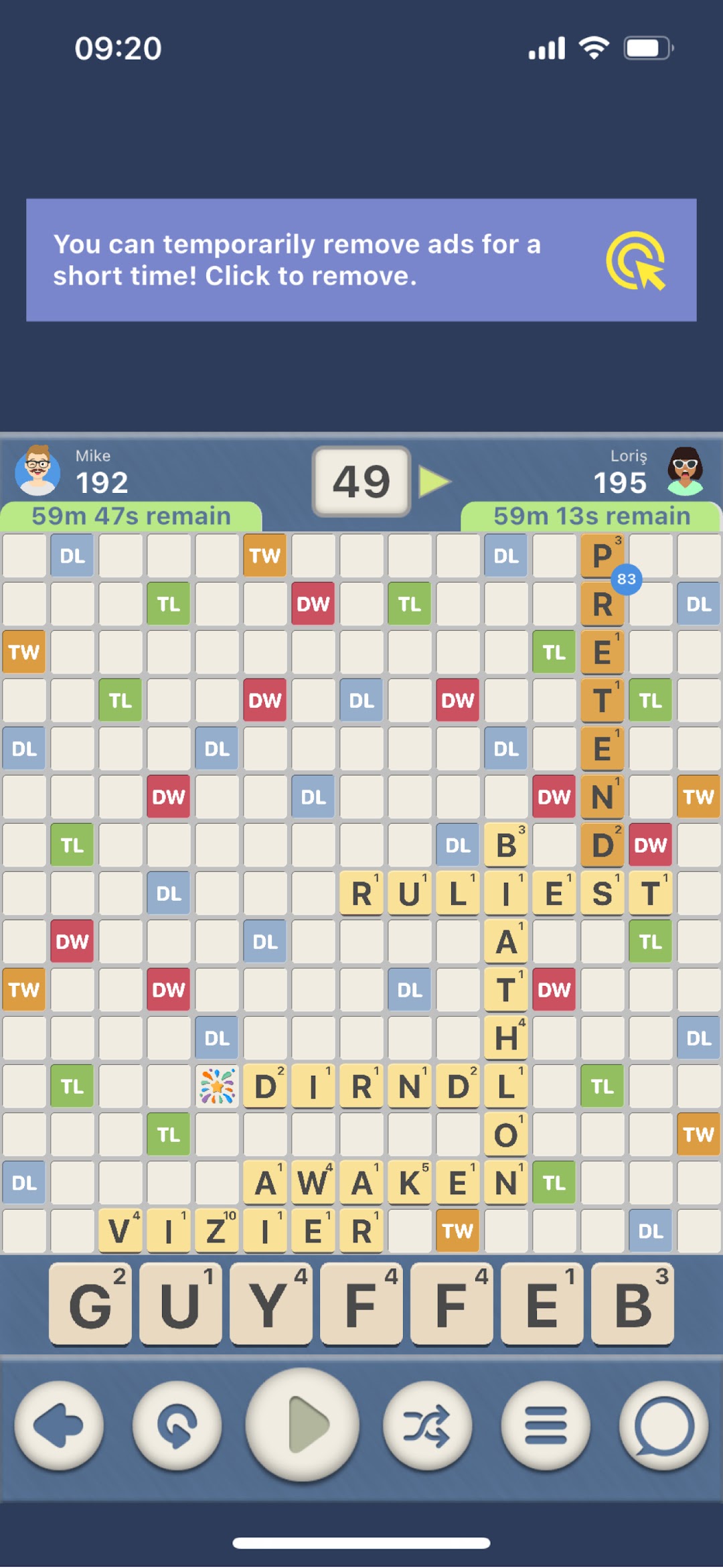
The game area consists of a 15 X 15 grid. Only one letter can be placed in each cell.

## Gameplay
* Wocable is played with 2, 3, or 4 players.
* Players start the game with 7 letters each.
* The player making the first move must create a word that passes through the center cell.
* Every word must be placed either horizontally or vertically.
* After the first move, every subsequent move must connect with at least **1 letter** that has already been placed.
* The player with the highest score at the end of the game wins.
* After each move, the player draws new letters randomly from the bag to replace the ones used.

## Wocable Letters
Wocable is played with 100 letters. Each letter appears in different quantities, and the points awarded for each letter vary. Letters that are more frequently used in English words score fewer points, while less common letters score more points.

## Using All Letters
The most effective way to earn extra points in Wocable is by using all your letters. If a player uses all 7 letters in a single move, they earn an additional 50 points on top of the points scored.

## Exchanging Letters
If a player cannot form a word with their letters or believes they can do better with different letters, they can exchange their letters. The player selects the letters they wish to exchange and requests new ones. However, there must be enough letters left in the bag to complete the exchange.

## End of the Game
### Scenario 1
- The game ends if a player makes a move and has no letters left, and there are no letters left in the bag.
- In this scenario, if the opponent still has letters, the player who used all their letters adds the value of the remaining letters to their score, and the player with remaining letters deducts the value of those letters from their score.
- The player with the highest score wins the game. If the scores are tied, the game ends in a draw.

### Scenario 2
- If players still have letters but can no longer form valid words on the board, they can end the game by passing 4 consecutive turns.
- The player with the highest score wins the game. If the scores are tied, the game ends in a draw.

### Scenario 3
- If a player quits the game at any point, their opponent wins.

### Scenario 4
- A player who fails to make a move within the allotted time is considered to have quit the game. Their opponent wins.

### Scenarios with More Than 2 Players
- The rules for 2-player games apply. However, if one player quits the game and more than 1 player remains, the game continues.
- At the end of the game, the winning player is considered to have defeated all other players. Players ranked lower in points are considered to have lost to those ranked higher.

## Accepted Words
- Wocable is based on the NASPA School Word List (2020 edition).
- You can access the accepted words in the dictionary section of the app.
Open up

Screenshots and Videos of Wocable PC

Experience a wider field of view, exquisite game graphics, and cooler combat skills and effects by downloading and playing Wocable on PC with LDPlayer. Enjoy the ultimate gaming experience with LDPlayer.

Why Play Wocable on PC with LDPlayer?

LDPlayer offers unique emulator features including multi-instance support, macros, operation recorder, and other functions not available on mobile devices.

Multi-Instance & Sync

Remote Control

Custom Controls

Multi-Instance & SyncRemote ControlCustom Controls

Effortlessly clone multiple instances and initiate synchronization until you draw the desired hero before binding your account, enhancing efficiency in rerolls in Wocable.

  • High FPS

    With support for high FPS, Wocable's game graphics are smoother, and actions are more seamless, enhancing the visual experience and immersion of playing Wocable.
  • Video Recorder

    Easily capture your performance and gameplay process in Wocable, aiding in learning and improving driving techniques, or sharing gaming experiences and achievements with other players.

How to Download&Play Wocable on PC?

  • 1

    Download and install LDPlayer on your computer

  • 2

    Locate the Play Store in LDPlayer's system apps, launch it, and sign in to your Google account

  • 3

    Enter "Wocable" into the search bar and search for it

  • 4

    Choose and install Wocable from the search results

  • 5

    Once the download and installation are complete, return to the LDPlayer home screen

  • 6

    Click on the game icon on the LDPlayer home screen to start enjoying the exciting game

More From Temel Yazılım