Home/

Apps/

Beauty/

Makeup Bride Photo Editor

Makeup Bride Photo Editor
4.05+

Makeup Bride Photo Editor

Makeup photo editor to add wedding makeup on photo one tap. Makeup for brides

Download apkrecommend

Makeup Bride Photo Editor is developed and provided by Photo Editors & Games. LDPlayer offers the download service only.

Photo Editors & Games
How to Download&Play Makeup Bride Photo Editor on PC?
Last Updated: 2025-12-12
com.bridal.makeup.photo
  • Overview

  • FAQ

Run Makeup Bride Photo Editor on PC with LDPlayer

Makeup Bride Photo Editor is a Beauty application developed by Photo Editors & Games, but with the best Android emulator-LDPlayer, you can download and play Makeup Bride Photo Editor on your computer.

Running Makeup Bride Photo Editor on your computer allows you to browse clearly on a large screen, and controlling the application with a mouse and keyboard is much faster than using touchscreen, all while never having to worry about device battery issues.

With multi-instance and synchronization features, you can even run multiple applications and accounts on your PC.

And file sharing makes sharing images, videos, and files incredibly easy.

Download Makeup Bride Photo Editor and run it on your PC. Enjoy the large screen and high-definition quality on your PC!

Makeup photo on wedding day: Bridal makeup photo editor!

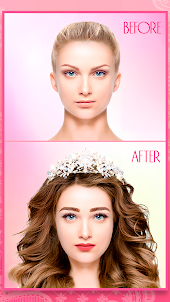
- Makeup for Brides photo has advanced tools to makeover face on photo in one-tap!

- Makeup for brides turns your selfie photo into awesome bridal selfie photo with perfect beauty makeover.

- Bridal makeup photo editor is very usefull auto makeup tool to add cosmetics on photo easy and fast!

- Choose make-up items you like (lipstick, eyebrows, eyelashes, eye, hairstyle or jewellery) and add makeup on photo one-tap!

- Bridal makeup photo editor - Perfect for brides who want look perfect on wedding.

- Bridal makeup photo editor designed especially for girls and womans who love wedding makeup and wedding hairstyle photo studio apps!

- Bridal makeup photo editor for FREE and share your beautiful wedding selfie!


Makeup Photo Editor FEATURES:


★ One click Bridal Makeup

Apply all face makeup and add new hairstyle on photo just with one click automatically!

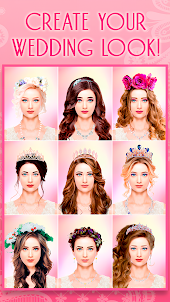
We prepare beautiful bridal makeup+hair sets for any face type! Awesome wedding styles! Try it all!


★ Wedding Hairstyles

Change your hairstyle on photo! Add new wedding hairstyles on photo from various fashion long hair or short hairstyles! You will love it!


★ Lipsticks

Find your perfect bridal lipstick tone from multiple lipsticks and lips shine gloss!


★ Eyelashes

Add mascara or false lashes on photo of your eyes to make your lashes long and lush.

Try colorful eyeshadows for your eyes photo. So beautiful bride!


★ Eyebrows

Apply fashion eyebrows on your face photo, try colorful eyebrows on photo! Amazing wedding makeup!


★ Wedding Jewellery

Add wedding jewelry on photo to complete bridal image!


HOW TO USE Bridal makeup photo editor:


1. Take a new photo or select one from your gallery

2. Add makeup and filter using photo editor tools.

3. Select other wonderful Makeup setting which you want to add to the photo.

4. Share your photos with your friends and family in social networks.

Bridal makeup photo editor ADVANTAGES:

★ Face Recognition Makeup Photo Editor detect your face on photo automatically! Apply makeup one-tap!

★ Beauty Bridal Makeup Photo Editor helps to create photo with perfect face!

★ Change hairstyles and face makeup to try different wedding styles on photo!


- Enjoy wedding day with makeup bride photo editor!

- Makeup photo editor right now absolutely FREE!
Open up

Screenshots and Videos of Makeup Bride Photo Editor PC

With LDPlayer, you can download and run Makeup Bride Photo Editor on PC, simultaneously managing multiple apps and multiple accounts. Become a master of time management, balancing work and entertainment effortlessly.

How to Download and Run Makeup Bride Photo Editor on PC

  • 1

    Download and install LDPlayer on your computer

  • 2

    Locate the Play Store in LDPlayer's system apps, launch it, and sign in to your Google account

  • 3

    Enter "Makeup Bride Photo Editor" into the search bar and search for it

  • 4

    Choose and install Makeup Bride Photo Editor from the search results

  • 5

    Once the download and installation are complete, return to the LDPlayer home screen

  • 6

    Click on the game icon on the LDPlayer home screen to start enjoying the exciting game

Search Recommendation
Download and Run Makeup Bride Photo Editor on PC for Free