
Girls' Frontline: Fire Control
All units: Fire-control modules installed. Prepare for immediate action.

Overview

FAQ

Game Guides
Use LDPlayer to Play Girls' Frontline: Fire Control on PC
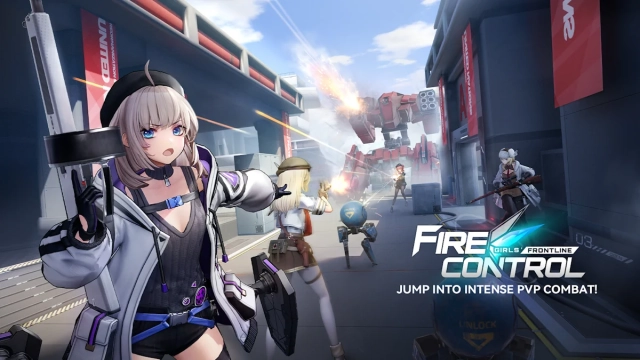
Girls’ Frontline: Fire Control is a third-person tactical shooter set in a collapsing multi-dimensional battlefield. As distortions threaten to consume reality, the goddess Lunasia summons elite Griffin T-Dolls to form strike teams capable of resisting the approaching catastrophe. While preserving the signature weapon-personification identity of the Girls’ Frontline universe, the game shifts toward high-mobility gunplay, strategic 5v5 combat, and dynamic battlefield objectives. Players coordinate squads, customize loadouts, and adapt to tense encounters across visually rich maps. Fire Control blends accessibility with tactical depth, offering a fresh, action-focused interpretation of the franchise.
Core Gameplay & Features
Core Gameplay
-
Third-person shooting with smooth movement, dodge mechanics, and cover-based engagements.
-
T-Dolls embody specific firearms, each with distinct abilities and battlefield roles.
-
Auto-aim assist lowers the barrier for newcomers while allowing skilled players to refine precision.
-
Features multiple modes including 5v5 competitive battles, PvE missions, and hybrid PvPvE encounters.
-
Maps introduce verticality, destructible elements, and shifting objectives that reward smart positioning.
Features
-
Tactical Chip System
-
Equip chips that grant effects such as fragmentation rounds, shields, traps, or critical buffs.
-
Chips create unique builds each match and encourage experimentation.
-
-
Team Composition Strategy
-
Balance assault, support, and control roles for effective synergy.
-
Emphasizes coordination and ability timing.
-
-
Accessible Yet Deep
-
Easy for beginners to pick up.
-
High skill ceiling through movement, chip synergy, and tactical decisions.
-
Player Impressions
Fire Control for successfully combining the Girls’ Frontline style with more dynamic and modern action gameplay. The Tactical Chip system adds depth and replay value, while the approachable aiming system makes it friendly for new players. Soft-launch balance tuning continues, but the core combat loop is already considered fast, fluid, and engaging for shooter fans and franchise players alike.
Play Girls’ Frontline: Fire Control on PC with LDPlayer for Best Experience
-
Ultra Screen offers wider clarity and sharper visual fidelity.
-
High FPS delivers smooth motion for precise aiming.
-
Custom Controls enable full keyboard-and-mouse optimization.
-
Battery-free Play prevents mobile device wear and overheating.
-
Multi-instance Sync supports multiple accounts and parallel sessions.
-
Stable Performance keeps intense 5v5 battles consistently fluid.
Download LDPlayer today, launch Girls’ Frontline: Fire Control, and take command of your T-Dolls with superior control and unstoppable clarity on PC.
Screenshots and Videos of Girls' Frontline: Fire Control PC


Why Play Girls' Frontline: Fire Control on PC with LDPlayer?
 Ultra-Wide Screen
 Keyboard Mapping
 One-Click Macro




Utilizing the expansive screen, it offers a panoramic, all-encompassing view of the game in Girls' Frontline: Fire Control, leaving no blind spots. Players can observe game details with crystal clarity and react instantaneously.

High FPS
With support for high FPS, Girls' Frontline: Fire Control's game graphics are smoother, and actions are more seamless, enhancing the visual experience and immersion of playing Girls' Frontline: Fire Control.
Extended Battery Life
When running Girls' Frontline: Fire Control on your computer, you need not worry about low battery or device overheating issues. Enjoy playing for as long as you desire.
How to Download&Play Girls' Frontline: Fire Control on PC?
 1
1Download and install LDPlayer on your computer
 2
2Locate the Play Store in LDPlayer's system apps, launch it, and sign in to your Google account
 3
3Enter "Girls' Frontline: Fire Control" into the search bar and search for it
 4
4Choose and install Girls' Frontline: Fire Control from the search results
 5
5Once the download and installation are complete, return to the LDPlayer home screen
 6
6Click on the game icon on the LDPlayer home screen to start enjoying the exciting game


